


Simplest 3-Step Way to Download Facebook Videos in 2026
Most Facebook downloaders are more work than the job deserves. You land on a page covered in buttons, three of which are advertising dressed up to look like the real one. You click the right one and a second tab opens. Somewhere in there you are asked to install an extension, or allow notifications, or wait through a countdown.
Saving a video should be one action, not a small errand. This guide covers the shortest version of it — three steps, no account, nothing installed — and then mentions two alternatives worth knowing.
FvidGo
What Is FvidGo
FvidGo is a free online Facebook video downloader designed around exactly three steps: copy the link, paste it, download. It runs in your browser, so there is no app to install and no account to create, and there is no cap on how many videos you save.
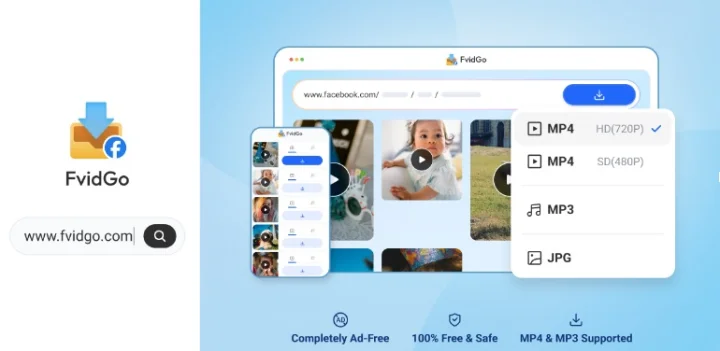
The page itself is one input box and, after a second or two, a short list of the available files. There is no interstitial between pasting and results, no captcha, no countdown, and no advertising competing with the download button.
Key Features
- Three steps end to end, with no interstitial pages or countdowns
- No account, no registration, and no extension to install
- Resolution up to 1080p with SD and HD both shown so you pick
- Covers feed videos, Reels, Stories, private videos, photos, and MP3 audio
- Unlimited free downloads with no daily cap
- A clean page with no ads and no sign-up wall
- Works in Chrome, Safari, Edge, and Firefox on any device
- Nothing kept on the server: no files stored, no download history logged
The Three Steps
- Copy the link. In the Facebook app, tap the three dots on the post and choose Copy link. In a browser, copy the address of the post from the address bar.
- Paste it at fvidgo.com. Drop the link into the input box and start the search. Results come back in a second or two.
- Pick your quality and download. Choose SD or HD from the list. The file goes straight to your gallery on a phone or your downloads folder on a computer.
Why FvidGo Is the Simplest Option
Simplicity here is not a slogan, it is the absence of specific things. There is no install step, so the first video you ever save takes the same fifteen seconds as the hundredth — no app store, no permissions dialog, no app. There is no account, so nothing to create, verify, or remember, and no reason for the site to know who you are. And there is no advertising layer, which is what most of the clicking on other download sites actually is: working out which button is real.
The quality choice is the one place where an extra decision earns its keep. Rather than a single unlabelled button handing you whatever file resolves fastest, the results list shows SD and HD so you take the one you meant to. That is the difference between a saved video that looks like what you watched and one that looks soft — and it costs you one glance.
Everything else stays out of the way. Downloads are unlimited and free however many you run through it. The same page works on an iPhone, an Android phone, a Mac, or a Windows laptop, so there is nothing to learn twice. It doubles as a Facebook Reel downloader: coverage extends past ordinary feed videos to Reels, Stories, private videos, photos, and audio, so the three steps do not stop working when the content type changes. And because nothing is stored on its end, there is no record of what you saved sitting on a server afterwards.
Snaptube
Snaptube is an Android app, so it starts with an install — which is the opposite of the point above, but worth it in one specific case: if you download often, the per-video effort ends up lower than any web page can manage.
You install it once from the official site or from stores like Xiaomi GetApps, Huawei AppGallery, OPPO App Market, vivo V-Appstore, HONOR App Market, Samsung Galaxy Store, and Palm Store; it is not carried on Google Play. After that, format memory means the app stops asking which option you want, so a save is a paste and a single tap. It covers more than 100 platforms with resolutions from 144p to 8K depending on the source, outputs MP4, MP3, and M4A, handles batch and playlist downloads in the background, and plays saved files in its own player. Around 20MB installed, storage permission only, free with no subscription. If you save a handful of videos a week, the install pays for itself; if you save one occasionally, a browser tool is simpler.
SnapSave
SnapSave (snapsave.app) is a browser tool with a similarly short flow — paste a link, get a file — covering public Facebook videos, Reels without a watermark, and Stories while they are still live. It supports 1080p and needs no install or account.
Its distinguishing feature is removing the watermark from Reels as part of the same request, which saves a separate editing step. Two cautions. First, snapsave.app and snapsave.io are separate sites with separate operators, so reviews of one say nothing about the other. Second, the page carries premium-style prompts that add clicks if you follow them, and there have been Reddit reports of small verification charges turning into recurring ones — stay on the plain download path. Security scanner Gridinsoft also gives the domain a low trust rating, so treat it as a secondary option.
What Actually Makes a Downloader Simple
- No install. An app is several minutes and a permissions decision before it downloads anything.
- No account. Registration exists to collect an address, not to make downloading work.
- No fake buttons. Sites funded by pop-under advertising put the real download button among decoys, and that is where most of the clicking goes.
- One visible choice. Quality is the only decision worth presenting. Everything else should be a default.
Which One Should You Use?
For occasional saves, FvidGo is the simplest end to end: three steps, no install, no account, no ads to click past, and a visible quality choice — free and unlimited. Facebook private video download runs through the same three steps on its own page. If you download several videos a week on Android, Snaptube's one-time install lowers the per-video effort further with format memory and batching. SnapSave is worth trying specifically when a Reels watermark is what you want gone.
FAQ
Do I need to install anything?
No. FvidGo and SnapSave both run in a browser. Only Snaptube needs installing, because it is an Android app. Any site telling you to install a browser extension to download a video is adding a step you do not need.
Do I have to create an account?
No, and you should not enter Facebook credentials into any downloader that asks. Public posts are readable from their link alone.
Where does the file go?
On a phone, your gallery or Downloads folder. On a computer, your browser's downloads folder. On an iPhone, Safari puts it in Files under Downloads, and you can move it to Photos with the share button.
Which quality should I pick?
HD if you will watch it on anything larger than a phone, or if the video has text or fine detail. SD if you are short on storage or mobile data — on a phone screen the difference is smaller than the file size suggests.
Is there a limit on how many videos I can save?
Not with FvidGo. Downloads are unlimited and free, with no account and no daily cap.


