


Best Music Downloader Apps for Offline Playlists in 2026
Streaming music is fine until the signal drops. On the underground, on a plane, in a gym basement, or anywhere your data allowance has run out, the playlist you built is unavailable and the app shows you a spinner. Saving audio locally solves that permanently, and it does not require paying for a tier whose only real feature is offline mode.
Audio has its own requirements, though. Bitrate matters more than people expect, playlist handling saves the most time, and plenty of general video downloaders treat audio as an afterthought — you get a converted file at whatever quality they felt like. The six tools below all handle audio properly, with Snaptube ahead of the rest.
1. Snaptube
What Is Snaptube
Snaptube is an Android video and music downloader, and the music half is a genuine half rather than a bolt-on. It has its own audio search, its own bitrate options, and playlist handling built for tracks rather than adapted from video.
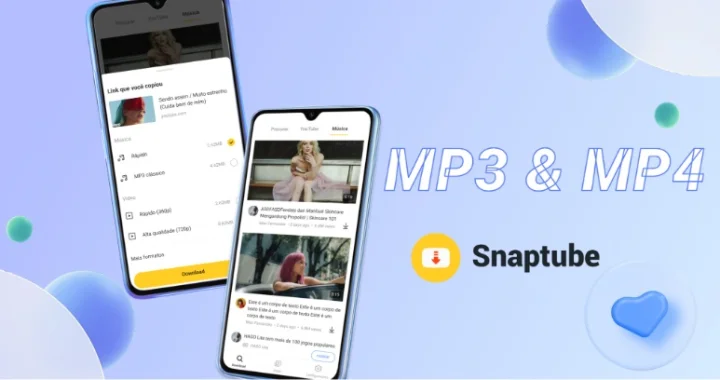
You search for a track by name inside the app or paste a link, and it returns the audio options directly. Its music search reaches across sources including Deezer, Tidal, Shazam, and Spotify content, so finding a specific song does not mean hunting for the page it lives on first.
Key Features
- Audio from 70kbps up to 320kbps, the widest bitrate range here
- MP3 and M4A output, so you can pick the format your player prefers
- Built-in music search across sources including Deezer, Tidal, Shazam, and Spotify content
- Playlist downloading, so a whole list queues in one action
- Subtitle downloads convertible to lyrics, so saved tracks carry their words
- Background downloading with pause and resume
- Built-in player with a repeat mode, plus a private vault for saved audio
- Format memory, so a playlist does not prompt on every track
- Around 20MB installed, storage permission only, completely free
How to Build an Offline Playlist
- Install Snaptube from the official site or your phone's own store — Xiaomi GetApps, Huawei AppGallery, OPPO App Market, vivo V-Appstore, HONOR App Market, Samsung Galaxy Store, or Palm Store.
- Search for the track or paste a playlist link. The search returns audio options without needing you to find a source page.
- Choose MP3 or M4A and set the bitrate — 320kbps if you care about how it sounds, lower if storage is tight. Start the queue. Format memory means the rest of the playlist follows your choice without asking.
Why Snaptube Is the Strongest Music Option
The bitrate range is the headline. 70kbps to 320kbps is a genuine ladder, and 320kbps is the point at which a compressed file stops being distinguishable from the source on most equipment. Every other tool here outputs MP3 without giving you that level of control, which means accepting whatever they default to.
The music search is the second real advantage. Every other tool on this list needs you to find a page first, copy its link, and paste it. Snaptube lets you type a song name and get audio options back, which changes building a twenty-track playlist from an afternoon into a few minutes.
Then there is the lyrics capability, which nothing else here offers: subtitle data can be turned into lyrics attached to saved music, so tracks arrive with their words rather than as bare files. Add M4A as well as MP3 for players that prefer it, playlist queueing with format memory, background downloads with resume, a built-in player with repeat, and a private vault — all free with no subscription: download Snaptube once and the 20MB app asks only for storage permission.
2. VidMate
VidMate outputs MP3 alongside video and supports 1080p on the video side. For audio specifically, the features that help are background downloading and resume support, which keep a long queue of tracks progressing through an unreliable connection. Its search and discovery feed make finding music reasonably direct.
The cost is the advertising, which reviews consistently describe as heavy, with full-screen and pop-up placements around the download flow — more noticeable when you are saving thirty tracks than one video.
3. InsTube
InsTube is the closest thing here to a dedicated music tool besides Snaptube, because it includes a built-in music downloader that lets you search for a track directly rather than locating a page first. It outputs MP3 and M4A, covers over 100 sites, and supports 1080p on the video side.
The app is small and the interface plain, which suits a phone that is mostly full of audio files. Video Lock, its encrypted space, works for audio too if you would rather saved tracks were not visible in a shared gallery.
4. TubeMate
TubeMate has a specific advantage for audio: it converts to MP3 or M4A during the download rather than saving a video and converting afterwards. That is one step instead of two, and it also means you are not storing a video file you intend to discard. It supports MP3, AAC, and M4A output, and its multi-threaded downloading keeps a queue of tracks moving.
Its browser-with-a-download-button design makes it easy to operate with no learning curve. Devian Studio still maintains it, with a release in June 2026. Take it from tubemate.net only, because fake apps and imitation sites are unusually common for this brand. The free version's full-screen ads have drawn Trustpilot complaints, and audio conversion is the operation users most often report stalling when a source changes how it serves files.
5. Videoder

Videoder extracts audio as MP3 and its batch downloading suits playlists, with multi-threaded acceleration to keep a queue moving. It covers a broad list of sources and runs on Android and Windows, which suits people who assemble a music library on a computer and sync it to a phone.
The maintenance status is the thing to weigh. Uptodown has marked the project as discontinued, with catalogued releases stopping in 2023, and newer builds only appear on third-party app sites. Audio extraction depends on current handling of how sources deliver files, so it is among the first things to break when a parser falls behind. Modified and cracked builds circulate widely. If you try it, take it from videoder.net and treat it as a legacy option rather than the basis of a music library.
6. SaveFrom.net

SaveFrom.net supports MP3 extraction and needs no install at all, which makes it the option that works on a computer where you cannot install software — a work machine or a library PC. Open the site, paste a link, take the MP3. It covers 40-plus platforms including Facebook, Instagram, TikTok, Vimeo, and Dailymotion.
Two caveats. The site funds itself with pop-under and redirect advertising, which security scanner Gridinsoft rates at 39/100, so an ad blocker and care over which button you click are advisable. And it changes domains fairly often, so confirm you are on the current one. There is no playlist handling, so it is one track at a time — fine for filling a gap, slow for building a library.
What Actually Determines Audio Quality
Three things, and only one of them is the downloader:
- The source. An extracted MP3 cannot be better than the audio inside the file it came from. If the upload was compressed, that is your ceiling regardless of the bitrate you select.
- The bitrate you choose. 128kbps is fine for podcasts and speech. For music on decent headphones, 320kbps is where compression stops being audible, which is where Snaptube's range is useful. Selecting a high bitrate describes what the tool will output, not what it can create, so 320kbps on a weak source gives you a large file that sounds like the small one.
- The format. MP3 plays everywhere. M4A is more efficient at the same perceived quality but is not as universally supported by older car stereos and cheap players. If in doubt, MP3.
Which One Should You Use?
Snaptube is the clear pick for music: the widest bitrate range at 70kbps to 320kbps, a built-in music search that skips the find-the-page step entirely, playlist downloading with format memory, lyrics attached to saved tracks, and MP3 or M4A output — free, with no subscription anywhere in it. InsTube is the closest alternative with its own music search. TubeMate is worth it for converting during the download rather than after. VidMate handles MP3 competently if you accept the advertising. SaveFrom.net is the answer on a machine you cannot install anything on, and Videoder is worth knowing about rather than relying on.


