


How to Download High-Quality Images from Pinterest to Your Phone or Computer

Saving an image to a Pinterest board is useful when you want to find it again. Sometimes, though, you need the actual file on your phone or computer. An outfit reference may be easier to keep in your gallery, a recipe image is useful while cooking, and a travel photo may need to be available offline.
For most image Pins, downloading the file is not difficult. The main thing is to avoid saving a small feed preview or taking a screenshot when Pinterest has a better version available.
Pinterest also mixes photos with other media. If you open a Pin and find a video instead of a still image, a Pinterest video download tool can help when Pinterest does not offer a convenient way to save the clip.
For regular images, check Pinterest itself first.
Start with Pinterest's Download Image Option
Open the image Pin and check the menu for Download image.
If the option is available, use it. For a normal single-image Pin, this is usually the quickest way to save the image to your device.
Pinterest's Save and Download image buttons do different things. Save keeps the Pin in one of your Pinterest boards. Download image saves the actual image file outside Pinterest.
On a computer, the file normally goes to your browser's Downloads folder. On a phone, the exact location depends on your device and browser.
If Pinterest already gives you the image file you need, there is no reason to add another step.
Why Screenshots Usually Look Worse
A screenshot works in a hurry, but it only captures what is visible on your screen.
If Pinterest is showing a smaller preview, that is effectively the version you are capturing. You may also end up with unwanted cropping or parts of the Pinterest interface around the image.
Saving directly from the home feed can cause a similar problem. Pinterest uses smaller previews in the feed, so the image you see there may not be the best version available for that Pin.
Open the individual Pin before saving anything. If Download image is available, use the file Pinterest provides rather than taking a screenshot.
If the Pin turns out to be a short clip, screenshots are even less useful. Some Pinterest clips are reposted from TikTok, and when the soundtrack is the part you want to keep, a TikTok to MP3 tool is more practical than saving frames from the video.
Download High-Quality Pinterest Images with Pinpea, a Pinterest Image Downloader
Pinterest's Download image button is fine for one ordinary Pin. If the button is missing, or you want images from a carousel, board or profile, a Pinterest image downloader is more convenient.
For the steps below, we'll use Pinpea Pinterest Downloader.
Pinpea supports more Pinterest link types than most Pinterest image downloaders. It works with regular Image Pins, pin.it short links, carousels, boards, profiles, Idea Pins, Story Pins, Pinterest Answers, multi-Pin share links and regional Pinterest domains, as long as the content is public.
Its web version is ad-free, does not require a Pinterest login or software installation, and lets you preview the result before downloading. The media is fetched from Pinterest's CDN, and Pinpea does not keep a download history.
Step 1. Copy the Pinterest Link
Open the Pin or Pinterest page containing the image you want.
On a phone, tap Share and then Copy link. If Pinterest gives you a pin.it short URL, you can use it directly.
On a computer, copy the URL from the browser's address bar.
Use the link to the actual Pin, carousel, board or profile rather than a Pinterest search page or home feed.
Step 2. Paste the Link into Pinpea Pinterest Downloader
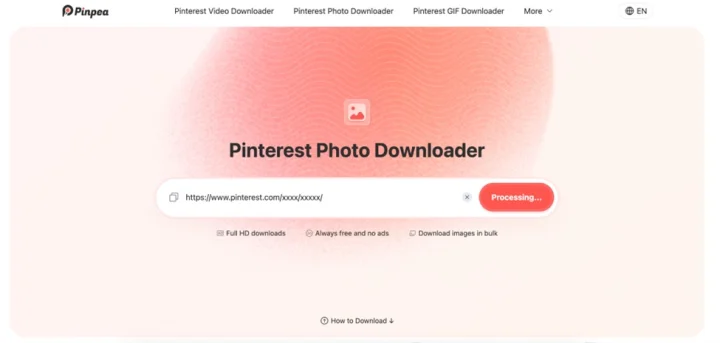
Open Pinpea in your browser and paste the copied URL into the download box.
Pinpea checks the public media Pinterest currently provides for that link and loads the available results. You do not need to sign in to Pinterest first.
A normal Image Pin may return one image. A carousel, board or profile can return several.
Step 3. Preview and Download the Image
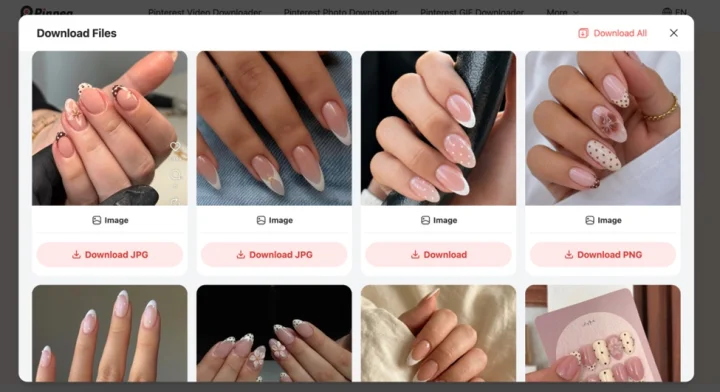
Check the preview before downloading, especially when a Pin contains several similar images.
Pinpea retrieves the highest-quality image version currently available from Pinterest and keeps the format Pinterest provides, including JPG, PNG and WebP. If the source is a PNG with a transparent background, that transparency is preserved in the downloaded file.
For links with multiple results, Pinpea can display up to 25 items. You can download all displayed results together in one batch, or save individual images one by one if you only need a few.
What If Pinpea Can't Process the Pinterest Link?
If a link does not return any media, first check whether the content is public.
Private Pins and content inside secret boards cannot be processed by Pinpea. You may still be able to open one while signed in to your own Pinterest account, but that access comes from your Pinterest session. Copying the URL does not give a downloader the same permission.
One quick way to check is to open the Pinterest link in a private or incognito browser window. If the content is no longer visible without your account access, privacy is probably the reason the link cannot be processed.
The Pin may also be unavailable. Content that has been deleted, removed or otherwise made inaccessible cannot be retrieved from an old URL.
A poor or unstable connection can cause problems too. If the Pin is public and still available, make sure it opens normally in Pinterest before trying the link again in Pinpea.
There is no need to expand a normal pin.it link manually. Pinpea supports Pinterest short links directly.
What Does High Quality Mean on Pinterest?
A high-quality Pinterest image is not always the same thing as the exact file the creator originally uploaded.
Pinterest processes images for different screens and different parts of its site. One Pin may therefore have several available image sizes.
Pinpea retrieves the highest-quality version Pinterest currently makes available. It does not take a small preview and enlarge it just to produce bigger pixel dimensions.
It also keeps the image format Pinterest provides rather than converting everything to JPG. That matters for PNG files with transparent backgrounds, because the transparency is preserved instead of being replaced with a solid background.
If Pinterest only provides a smaller version of an image, doubling its dimensions afterward will not recreate the missing detail.
For everyday uses such as outfit references, recipes, wallpapers, mood boards or travel planning, the best available Pinterest version is usually enough. If you need the creator's actual source file for printing, photography or professional design work, the original website or publication is a better place to look.
How to Avoid Downloading a Smaller Pinterest Image
A lot of disappointing downloads happen before the download itself.
Saving a thumbnail from the feed, taking a screenshot or enlarging a small file afterward can all leave you with a softer image than necessary.
- Open the individual Pin instead of saving the image from the feed.
- Use Download image when Pinterest provides it.
- Avoid screenshots when an image file is available.
- Keep the highest-quality version Pinterest actually provides.
- Do not treat an enlarged image as a higher-quality source.
- Keep JPG, PNG or WebP when there is no reason to convert the file.
A photo can look perfectly sharp on a small phone screen and still look soft once you open it at full size on a laptop.
Downloading Images from Carousels, Boards and Profiles
Downloading one photo is easy. Repeating the same process twenty times is less appealing.
A carousel may contain several angles of the same outfit or several steps from a recipe. A board or profile can contain many more images.
Pinpea can process these public links and show up to 25 results in one request. If you want everything currently displayed, you can download the results together. If you only need certain images, you can save them individually.
For example, a board may return 25 images while only six are useful for your project. In that case, downloading those six one by one can leave you with a much cleaner folder than saving the entire batch.
Check Whether the Pin Is an Image, GIF or Video
Not everything that appears in a Pinterest board is a still image.
Fashion boards may include animated GIFs and short styling videos. Entertainment boards often mix photos with fan edits, while travel collections can contain both images and short location clips.
If it is a normal image, save the image file. If it is a GIF, saving one frame will lose the animation. If it is a video, you need the video file if you want to keep the movement and sound.
Some clips on Pinterest were originally posted on other platforms, so it can be worth checking the original post when you need more information about the source.
For a Pinterest image, there is no need to complicate things: save the actual image file rather than a screenshot of it.
Can You Reuse a Downloaded Pinterest Image?
Downloading a picture does not automatically give you permission to publish it somewhere else.
Pinterest contains work from photographers, artists, bloggers, stores, brands and many other creators. Pinterest may simply be where you discovered the image.
Keeping a photo as a private outfit reference or mood-board idea is very different from putting it in a public article, advertisement or social post.
If you plan to repost, publish or use an image commercially, check the original source and make sure you have permission before using it. If you think you may reuse an image publicly later, keep the creator name or original source with the file so it is easier to check the usage rights.
For a normal image Pin, Pinterest's own Download image button is usually enough. Pinpea is more useful when that button is missing or when you are working with a carousel, board, profile or another public Pinterest link that contains several files.
Whichever method you use, judge the result by the image Pinterest actually provides, not by a large-sounding resolution label. A real higher-quality source is useful; an enlarged thumbnail is still a thumbnail.


