


3 Best Ways to Find Audio from Instagram Reels Easily

Instagram Reels can introduce you to a song in seconds—whether it is a trending pop track, an old classic, an underground DJ edit, or a creator’s original sound. The challenge comes when the Reel does not show a clear artist and song title, the audio is tagged as “Original audio,” or speech and sound effects make recognition difficult.
Fortunately, you can usually identify a Reel’s music with three practical approaches: check Instagram’s own audio attribution, extract or save the audio for closer listening, or use a song-recognition tool built for Reel links. Instagram may automatically change an audio label to an artist and song title when it detects licensed music, but not every upload receives complete attribution.
Why Find Instagram Music?
Finding music from Instagram Reels is useful for far more than satisfying curiosity. A sound can become part of a creator’s content strategy, a brand’s trend research, a playlist, or the inspiration for a new video idea.
Here are several reasons people look for music from Instagram Reels:
- Discover new artists and songs. Reels often spread tracks before they become widely recognizable elsewhere.
- Save sounds for future content. If a sound fits your video concept, you may want to return to the audio page and explore other Reels that use it.
- Build playlists. Once you know the song title and artist, you can add it to Spotify, Apple Music, YouTube Music, or another preferred platform.
- Research trends. Marketers, creators, and social-media managers can identify audio patterns behind high-performing content in a niche.
- Find the exact version. A Reel might use a remix, sped-up edit, mashup, instrumental section, or live version rather than the original release.
- Reuse your own saved content. When you find a Reel with useful background music, having an offline copy of the audio can make it easier to review later—provided you respect creators’ rights and platform rules.
One important distinction: finding a song is not the same as obtaining permission to publish it in your own commercial content. Music ownership and licensing still apply. Giving credit to an artist is not a substitute for a relevant license or permission from the rights holder.
How to Download Audio From Instagram Reels?
If you want to keep a Reel sound for offline listening, review it more carefully, or prepare it for song recognition, Snapgram provides a simple browser-based option. Rather than installing software or recording audio through your phone speaker, you can copy a public Reel link and process it online.
An instagram downloader can be useful when you need to save publicly accessible Instagram content for offline review. For audio-specific needs, the Instagram audio downloader is the more relevant option because it is designed to help extract the sound from public Instagram video content.
What is Snapgram?
Snapgram is an online Instagram download tool that works through a web browser. It is designed for users who want to save available Instagram content by pasting a copied link into the tool.
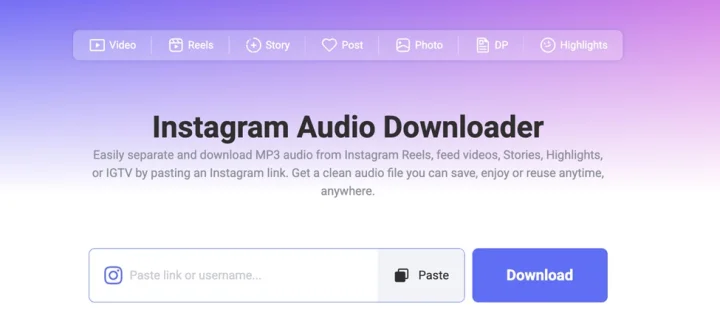
For music discovery, its main benefit is not only storage. Extracting audio from a Reel can make it easier to:
- Replay the sound without reopening Instagram
- Listen with headphones and catch lyrics or production details
- Skip to the clearest music-only section
- Compare multiple versions of a trending sound
- Upload a cleaner sample to an audio-recognition platform
- Preserve the original audio reference while researching a trend
If you need the entire video—not just the sound—you can use an Instagram reels downloader. This can be helpful when visual clues matter. For example, a Reel may show lyrics on screen, include the DJ’s name in a text overlay, or display album artwork that helps identify the music.
How to Get Your Favorite Instagram Reel Music?
- Open Instagram and find the public Reel containing the audio you want to save.
- Tap the Share icon or the three-dot menu.
- Choose Copy link.
- Visit the Instagram audio downloader.
- Paste the copied Reel URL into the input box.
- Start the processing or download action.
- Save the available audio file to your device.
- Play the audio and identify the clearest section of the track.
For a full Reel video download, choose the download format as MP4 instead. Keeping the video can be valuable if you need to inspect the caption, on-screen text, creator handle, comments, or other visual signals connected to the song.
When Downloading Instagram Audio Helps Most?
Downloading Reel audio is especially useful in situations where Instagram’s song label is incomplete or unhelpful:
- The Reel says “Original audio” instead of displaying the artist and song name.
- A creator speaks over the song and you want to replay the background music.
- The sound is a remix, sped-up version, mashup, or DJ edit.
- The song begins only briefly and is difficult to catch while scrolling.
- You want to search lyrics from a clearer sample.
- A URL-based song finder cannot process the Reel link properly.
- You want an audio file to upload to a music-recognition tool.
For example, imagine that you find a Reel using a mellow electronic track beneath a travel-video voiceover. Instagram lists only “Original audio,” and the comments do not identify the music. You can save the audio with Snapgram, locate a 15-second section where the narrator stops speaking, then submit that segment to a recognition service. This gives the tool a stronger chance of finding the right track.
3 Best Instagram Song Finders to Identify Reel Music
Once you have a Reel link or a clean audio file, a song finder can help identify the music. The three tools below solve slightly different problems: TrackRadar is strongest for social-context discovery, SongFromReel is built for quick Reel-link checks, and SongFinder is useful when you already have an extracted audio or video file.
| Tool | Best use case | Input | Why it is useful |
| TrackRadar | Complex Reels, DJ tracks, underground music, contextual discovery | Public Instagram Reel/post URL | Analyzes audio, captions, comments, and on-screen text |
| SongFromReel | Quick song lookup from an Instagram Reel | Public Reel URL | Reel-specific recognition with song and streaming information |
| SongFinder | Audio with speech, noise, edits, or difficult recognition conditions | Uploaded audio/video file or live recording | Lets you work from a downloaded sample instead of relying only on a link |
1. TrackRadar
TrackRadar is an online track-discovery platform that can identify songs from Instagram links as well as other social content. Its Instagram Reel song finder accepts public Reel, post, and carousel links. It is designed for music that may not be easy to identify through ordinary metadata alone.
Unlike a basic audio fingerprinting tool, TrackRadar says it can combine multiple signals: Reel audio, captions, comments, visible text, and social context. This can be useful when the creator or commenters have provided a clue that the audio itself does not reveal.
Key Features
- Supports public Instagram Reels, posts, and carousels
- Analyzes audio along with caption text, comments, and on-screen text
- Can help identify songs associated with “Original audio”
- Provides links to music and catalog platforms, including Spotify, Apple Music, Bandcamp, and Discogs
- Useful for DJ mixes, niche releases, vinyl clips, and multi-track social videos
How It Works
Copy the URL of a specific public Reel and paste it into TrackRadar’s Reel song finder. Then allow the tool to analyze the post and return a likely track identification.
For stronger results, use a direct Reel URL rather than an Instagram audio-page link. Audio pages can carry a generic “Original audio” label and provide less context. A specific Reel gives the tool the actual video, audio, caption, and comments to examine.
TrackRadar is a good first choice when you suspect that the answer may be hidden in social context—for example, when a creator replies “Song is in the comments,” tags a producer, or includes a lyric fragment in the caption.
2. SongFromReel
SongFromReel is a web-based song-recognition tool made specifically for Instagram Reels. It allows users to paste a public Reel link and attempt to identify the song behind the video. When successful, it returns track and artist information along with streaming links.
This makes it a practical option for users who want a simple answer without extracting an audio file first.
Key Features
- Focused on finding songs from public Instagram Reels
- Uses a paste-link workflow
- Returns a likely song title and artist
- Provides streaming links for listening or saving the track
- Useful for Reels where the song is audible but not identified in Instagram’s audio labelsongfromreel+1
How It Works
- Open the public Instagram Reel.
- Copy the Reel link from the Share or three-dot menu.
- Paste it into SongFromReel.
- Start the identification process.
- Review the resulting artist, song title, and music-platform links.
- Listen to a preview to verify the match.
If the tool cannot identify a song, test another Reel using the same sound. A different creator’s version may have less talking, a longer hook, or a clearer mix. If link-based identification still fails, download the audio with Snapgram and use SongFinder with a clean audio segment.
3. SongFinder
SongFinder is an online music-recognition service that identifies songs from uploaded audio or video files, as well as live recordings made in a browser. It is especially useful when a Reel link does not work with a URL-based song finder or when you need to control the quality of the sample being analyzed.
This makes it a strong companion to an Instagram audio download workflow. Instead of submitting an entire Reel with competing sounds, you can upload only the section most likely to contain a match.
Key Features
- Supports audio-file uploads
- Supports video-file uploads
- Allows live microphone recording in a browser
- Is designed to identify music from recordings and files
- Can be useful for noisy, sped-up, remixed, or voiceover-heavy Reels
- Lets users work with an extracted sample rather than an Instagram URL alone
How It Works
First, download the Reel’s audio using the Instagram audio downloader. Then select a clear 10–30-second section of music, ideally without voiceover or abrupt sound effects. Upload the audio file to SongFinder and wait for its recognition result.
This method can be more effective for difficult audio. For instance, if a fashion Reel uses a fast remix beneath dialogue, a link-based finder may struggle. A downloaded audio file lets you isolate the instrumental hook or chorus, improving the chances that acoustic fingerprinting will identify the original recording.
Conclusion
Finding music from Instagram Reels does not need to be complicated. Begin by checking Instagram’s built-in audio label, caption, and comments. If you want to keep the sound, study it offline, or prepare a better sample for recognition, use Snapgram to download the Reel audio from a public link.
Then choose the recognition tool that fits the situation:
- Use TrackRadar for context-rich investigation, DJ tracks, and difficult social-media audio.
- Use SongFromReel for a quick public Reel link lookup.
- Use SongFinder after downloading audio, especially when voiceovers, edits, or noisy video make direct link recognition unreliable.
The strongest process is: copy the public Reel link, download a clear audio version when necessary, run it through one or more song finders, and verify the final match on a legitimate streaming service. Respect copyright and creator rights throughout the process—identifying or downloading audio does not automatically authorize reposting or commercial use.


